Archive for the 'Hardware' Category

If you’ve set all the basic security settings mentioned in my previous Securing Wireless Network Using Maxis WiFi Modem (E5832) post and want more, here is the advanced part.
Advanced Settings
)
Step 11: Click Advanced Settings > WLAN Settings > WLAN Advanced Settings. (click to enlarge)
)
Step 12: Change SSID Broadcast to “Disabled”. (click to enlarge)
By setting SSID Broadcast to “Disabled”, the network name will not be shown in the connection list. People who doesn’t know the network name won’t be able to see it in the connection list and therefore preventing strangers from connecting to our network. Anyway, we’ll need to manually add the network into the connection list when we connect to the network for the first time.
Continue Reading »
Securing Wireless Network Using Maxis WiFi Modem (E5832) – Advanced
One of many reasons I like using this Maxis WiFi Modem (E5832) together with the Apple ipad is that it supports many security features. Security is of the utmost importance especially in wireless network because we can never be sure who is connecting to the network if we don’t secure it.
I’ve compiled a step-by-step guide to effectively secure the wireless network when using Maxis WiFi Modem (E5832). We’ll need to connect the modem to a PC for configurations.
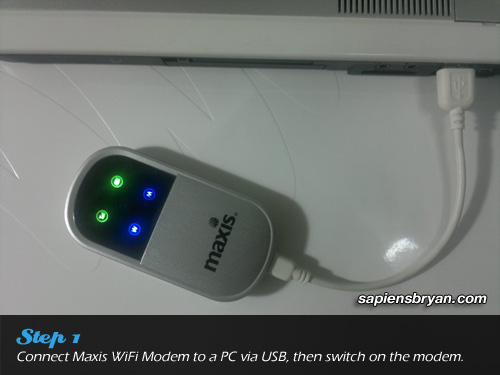
Step 1: Connect the modem to a PC, then switch it on.
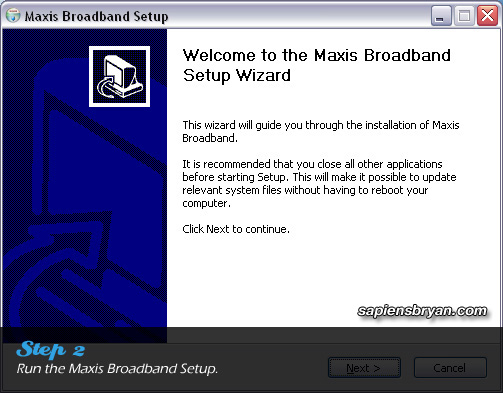
Step 2: Run the Maxis Broadband Setup to install device driver and necessary applications.
Once the installation is completed, carry on with the following steps :-
Continue Reading »
Securing Wireless Network Using Maxis WiFi Modem (E5832) – Basic
Foursquare check-in in Nokia’s Ovi Maps is finally available on Symbian^3 and S60 5th Edition devices! The following Nokia phones will get to enjoy this new feature in their Ovi Maps :-
- Symbian^3: N8, E7, C7, C6-01
- S60 5th Edition: N97, N97 mini, X6, C6-00, 5800XM, 5235 & 5230
Another new feature added into Ovi Maps 3.06 is “Add a public place“. You are able to add new places that Ovi Maps doesn’t have it yet, once it is reviewed everyone else will be able to find it in the maps.
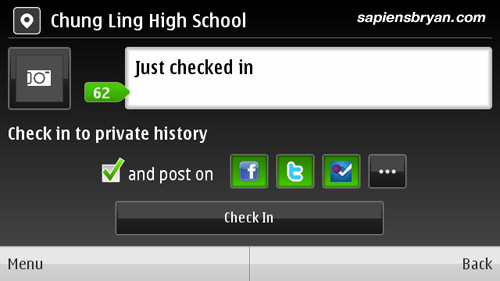
Check-in to places and share it on Facebook, Twitter & Foursqaure
Continue Reading »
Nokia Ovi Maps 3.06, Now With Foursquare Check-In
 A staff from Maxis Telemarketing Team called me yesterday to offer a special promotion for its Wireless Broadband service, so I thought I should share it with you all as well.
In this special promotion, the price for 3GB wireless broadband package is reduced to RM48/month only (from the original price of RM68/month)!
)
Maxis Wireless Broadband Promotion (click to enlarge)
Let me summarize the criteria you need to be eligible to enjoy the promotion :-
- 1. A Maxis postpaid customer.
- 2. Has been using the postpaid line for more than 12 months.
- 3. Never subscribe to any Maxis Broadband before.
If you meet all the above 3 criteria, now is a good opportunity to subscribe the 3GB wireless broadband. Not only you’ll save RM20/month from this special promotion, below are the things you’ll get from the promotion :-
- Enjoy up to 7.2Mbps wireless broadband speed.
- Save RM20/month from the original price.
- RM10 rebate for the first 5 months.
- Free E1552 modem
- No contract!
The free modem supports only 1 device, so if you are interested in sharing the wireless broadband connection with other devices you may want to consider getting Maxis WiFi Modem E5832.
Please note that there’s a RM100 activation fee for this special promotion, but I think it’s reasonable since you’ll be getting RM50 back from the rebate. It simply means you are paying RM50 to activate the wireless broadband service and start saving RM20 every month. :)
Please feel free to visit Maxis Wireless Broadband page or call this toll free number 1800 82 2000 for more information.
Maxis10 – Apple iPad & Maxis Wifi Modem (E5832) Review Series
- 1. Maxis10 – Apple iPad & Maxis WiFi Modem (E5832) Review
- 2. Share Wireless Broadband Using Maxis WiFi Modem (E5832)
- 3. Maxis Wireless Broadband Special Promotion! Save RM20/month!
- 4. Securing Wireless Network Using Maxis WiFi Modem (E5832) – Basic Mode
- 5. Securing Wireless Network Using Maxis WiFi Modem (E5832) – Advanced Mode
- 6. Apple iPad + Maxis Wireless Broadband = Save RM170 Instantly
- 7. The top 5 things I do MORE of … now that I have the Maxis WiFi Modem
- 8. 12 Things You Can Do In The Car With Apple iPad & Maxis Wireless Broadband
- 9. Maxis Wireless Broadband Speed Tests In Penang, Malaysia
- 10. Apple iPad (or iPad 2) & Maxis WiFi Modem Are Your Perfect Travel Mates
- 11. The top 5 things I do LESS of … now that I have the Maxis WiFi Modem
If you are a wireless broadband user, you might come across the following situation when you want to share the broadband connection to more than 1 device. Most of the wireless broadband modems in the market allow you to make connection from only one device at one time. So if you want to access the same wireless broadband service on 2 or more devices, you’ll need unplug the modem from one device then plug it to another. This is quite inconvenient especially when you need to switch between the devices regularly.
Maxis WiFi Modem (E5832) is designed to solve the above problem by allowing you to share the wireless broadband through WiFi connection to up to 5 devices simultaneously. The modem is very easy to operate, let me show you in the video below :-
Continue Reading »
Share Wireless Broadband Using Maxis WiFi Modem (E5832)
I was lucky to be selected as one of the ten reviewers for Maxis10 programme organized by Maxis. This time we’ll be reviewing two devices, Apple iPad 16GB 3G+WiFi version and Maxis WiFi Modem (E5832), in the next two weeks starting from 18th February, 2011.

Apple iPad 16GB (3G+WiFi) & Maxis WiFi Modem
Continue Reading »
Maxis10 – Apple iPad & Maxis WiFi Modem (E5832) Review


.................................


![SapiensBryan[a.t.]gmail[d.o.t.]com](https://www.sapiensbryan.com/wp-content/themes/adsincomewide/images/email.png "SapiensBryan[a.t.]gmail[d.o.t.]com")


Pages

Site Map
Admin
List All Posts Titles
By Month
- May 2016 (3)
- April 2016 (4)
- October 2015 (1)
- November 2014 (1)
- August 2014 (2)
- July 2014 (3)
- June 2014 (1)
- March 2014 (1)
- January 2014 (1)
- December 2013 (1)
- September 2013 (1)
- June 2013 (1)
- May 2013 (1)
- March 2013 (1)
- January 2013 (2)
- December 2012 (2)
- November 2012 (4)
- September 2012 (1)
- June 2012 (2)
- April 2012 (1)
- March 2012 (3)
- February 2012 (2)
- December 2011 (2)
- November 2011 (3)
- October 2011 (12)
- September 2011 (7)
- August 2011 (3)
- June 2011 (6)
- May 2011 (8)
- April 2011 (1)
- March 2011 (8)
- February 2011 (11)
- December 2010 (3)
- November 2010 (1)
- September 2010 (2)
- August 2010 (2)
- July 2010 (13)
- June 2010 (2)
- May 2010 (3)
- April 2010 (6)
- December 2009 (2)
- November 2009 (3)
- October 2009 (2)
- July 2009 (3)
- June 2009 (2)
- May 2009 (3)
- April 2009 (2)
- March 2009 (1)
- February 2009 (1)
- January 2009 (3)
- December 2008 (7)
- November 2008 (12)
- October 2008 (3)
- September 2008 (2)
- August 2008 (1)
- June 2008 (6)
- May 2008 (2)
- December 2007 (1)
- October 2007 (4)
- September 2007 (2)
- August 2007 (1)
- June 2007 (1)
- May 2007 (1)
- April 2007 (4)
- March 2007 (2)
- February 2007 (7)
- January 2007 (3)
- December 2006 (4)
- November 2006 (6)
- October 2006 (9)
- September 2006 (1)
- July 2006 (4)
- May 2006 (2)
- April 2006 (5)
- March 2006 (9)
- February 2006 (6)
- January 2006 (8)
- December 2005 (4)
- November 2005 (16)
- October 2005 (32)
- September 2005 (50)
- August 2005 (50)
- July 2005 (63)
- June 2005 (74)
- May 2005 (82)
- April 2005 (47)
- March 2005 (10)


