Ads Minded Wide Version

This post has been viewed 54295 times since Monday 15 May 2006 @ 4:08 pm

After 10 days since I released my first Wordpress theme named Ads Minded on May 4, 2005, here comes the wide version of the theme.
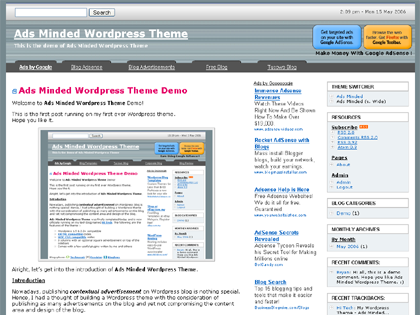
Ads Minded Wordpress Theme Wide Version

The main difference between the normal version and wide version is the width. The normal one is having the width of 770px whereas the wide version will have a width of 1000px. This version suits you if most of your blog readers are using screen resolution larger than 1024 x 768.

Before you proceed, I would like to recommend you the easiest way to Monetize Your Site using Text Link Ads.
Sign up now via the link or banner then start making money almost instantly!

Text Link Ads

Please check out the post of Ads Minded normal version for more information like the introduction and features of the Ads Minded.

The zip file here does not contain any plugin this time unlike the normal version Ads Minded. Hence the installation is even easier :-

Installation

  • 1. Unzip the downloaded file.
  • 2. Place adsmindedwide folder into /wp-content/themes folder.
  • 3. Login to WP admin control panel and enable Ads Minded (v. Wide) theme under Presentation.

Demo
Demo is available here.
You can use the Theme Switcher on the sidebar to switch between the wide version (1000px wide) and normal version (770px wide) in order to see the difference.

Note:
Please do not use my themes for sites with pornographic, sexist and/or racist content of any kind.

Donation

As suggested by some Ads Minded users, here is the donation button. By the way, the theme still remains FREE. :)

Any amount will do, I’ll take it as a bonus.
Thank you.

Change Log (Latest version is in bold)

  • v1.1 (May 16, 2006)
    • Added archive.php.
  • v1.0 (May 15, 2006) - The first version

Any feedback, please send me an email to My Email or drop a comment here. This theme is in version 1 at the moment, I’m sure more will come.
Thank you.

p/s : Those who are using this theme, please feel free to do a link exchange with this blog. As an appreciation, your website will be approved automatically. For everyone else, link exchange is still welcome, but the link exchange script will not approve your website if you do not have a link back.


Blogsphere: TechnoratiFeedsterBloglines
Bookmark: Del.icio.usSpurlFurlSimpyBlinkDigg
RSS feed for comments on this post


71 Responses to 'Ads Minded Wide Version'

  1. Ads Minded Wordpress Theme - May 15th, 2006 at 4:17 pm

    […] Enable all plugins included in the package before using this theme. Download Ads Minded Wordpress Theme v1.2 Downloaded times Download Ads Minded Wordpress Theme Wide Version v1.0 Installation detail please refer to the original post. Downloaded times […]

  2. Patrick - May 15th, 2006 at 5:49 pm

    Why dont try to release a fluid width instead of fixed width?

  3. SapiensBryan - May 15th, 2006 at 6:16 pm

    The ideal fuild version will need to have some flexible columns to accomodate more than 1 type of ads. I’m working on it at the moment.

    I hope I will be able to release it soon.

  4. Alex - May 22nd, 2006 at 3:42 pm

    looks sweet. may get this theme :D good work mate!

  5. SapiensBryan - May 22nd, 2006 at 3:46 pm

    Thanks, Alex!

  6. Yvy - May 23rd, 2006 at 9:19 am

    Oooooo…nice! I’ve always been a sucker for the width. ;) Keep it up…

  7. azrin - May 28th, 2006 at 4:43 am

    Looks cool.
    carry on the good work..

  8. Sharat - May 31st, 2006 at 3:12 am

    Hi Bryan, great theme undoubtedly. by the way i sent you mail. Do check it. also please let me know, if i can add an image as you have in the header left to the site’s name. and if yes then of what specifications shud it be. i’m using the ads minded WIDE version. thanks for this wonderful theme.

  9. SapiensBryan - May 31st, 2006 at 12:27 pm

    Hi Sharat,

    Yup, I’ve got your mail. Unfortunately, I’m now in a very critical stage of finishing my thesis, thus lack of reply to your email. Since your requests are not very critical, I will answer them once the works in hand are settled.

    You can replace the header image (name it “header_bg.jpg”) whichever made by you in the /images folder. Just make sure the new header image has 1000px in width.

  10. syed - June 1st, 2006 at 5:37 pm

    hey, cool blog!

  11. How to Blog : Comprehensive list of 875+ Free WordPress 1.5 and 2.0 Themes / Templates available for download - June 3rd, 2006 at 2:21 am

    […] Ads Minded - Wide Version NEW tested with WordPress 2.0 […]

  12. Sharat - June 3rd, 2006 at 5:51 pm

    well trying adding that image but doesn’t look too cool. the original theme was better. will get back to you soon. thanks bryan :)

  13. Daniel - June 4th, 2006 at 8:18 pm

    hey mate, top website. just giving a little comment to your theme, did you make it 100% yourself or have you just hacked away a few themes and made this one yourself? because i find my new theme which i just customized this morning every hard due to it being in php, so it makes me wonder how hard making a totally new theme must be. anyways tohught id just ask those few things and hope you reply when you get the chance. if you wanted to check out my new 3 column theme the url is geeksglobe.com

    keep up the good work
    Daniel

  14. SapiensBryan - June 5th, 2006 at 1:50 am

    Hi Daniel,

    Yup, I coded it from ground up with reference to the ultimate Kubrick theme. I have been using, tweaking and enhancing this theme since more than 6 months ago, just that I recently released it to the public for free.

    Well, I think creating a brand new theme is not very hard for ppl who know PHP and CSS well. By the way, I am only a beginner in both of them.

    Just went to your blog, it looks nice in my opinion. If creating a new theme is too much a problem for you, stick with your current theme isn’t a bad idea at all.

    Have a nice day.

  15. Vincent Abrugar - June 6th, 2006 at 10:54 am

    Hello,

    Thank you very much for creating this theme.

    I just installed it at my new blog at considerhealth.com please check it out.

    Can you please help me to find the bug, my blog loads fine. But it says on status bar Done, but with errors on pages. When opne the error it says:

    Line 4
    Char 1
    Error: ‘edButton’ is Undefined

    Thanks,

    Vince

  16. SapiensBryan - June 6th, 2006 at 1:06 pm

    Hi Vincent,

    You may try to use W3C Validtor to debug your website. I always use it for website coding validation. It tells you where is the error and possible reason as well.

    Hope you can solve it.

  17. Sharat - June 6th, 2006 at 4:50 pm

    Hi Bryan.
    Am Havin Tough Time With My New Blog.
    I Have Imported Posts From My Other Blogs On Bloggers, Etc. Every Post Is Being Published Under A Same Catogary Named “Uncateogarized”. That’s Not A Problem. But As Soon As I Switch Over To Ads Minded, The Blog Cateogaries Show This Message :”Warning: Invalid argument supplied for foreach() in /home/sharat/public_html/myblogs/wp-includes/template-functions-category.php on line 321″
    Anything I Can Do To Get Rid Of This Message And Also If I Can Know If There Is Any Way I Can Import The Posts From Different Blogs Into Different Cateogaries.
    This Time It’s Utmost Urgent.
    Sharat

  18. SapiensBryan - June 6th, 2006 at 6:16 pm

    Hi Sharat,

    I think this problem is not related to the theme. Anyway, it can be solved by just creating a new category (with or without any post).

  19. Sharat - June 6th, 2006 at 7:41 pm

    That Helps!
    Thanks Again

  20. Brad - June 7th, 2006 at 12:05 pm

    Hey there. I was wondering what part of the code you modify to take out the advertisement box in the top right. When I delete the code as it is, it still leaves the spae of the box there and I am just having trouble finding where to get rid of the whole thing. I would love to hear from you, and GREAT THEME by the way. Awesome stuff.

    Brad

  21. SapiensBryan - June 7th, 2006 at 12:48 pm

    Hi Brad, I think you might wanna refer to this comment.

    Have a nice day.

  22. HART-Empire.com » 1-800-HART’s Picks - Gets A New Facelift (HART-EMPIRE NETWORK) - June 7th, 2006 at 2:42 pm

    […] Naturally, it just made sense to try the Ads Minded Wide Version Theme by Hi-Tech […]

  23. Andrea - June 8th, 2006 at 1:18 am

    Hi, Bryan!

    First of all, I really love your theme. It streamlines so many of the things necessary to get any traffic to your blog. I have one quick question (well, actually a couple, but they’re related). First, while the AdSense shows up fine on my individual post pages, on my home page, I’m still getting one big PSA ad after about three days. Also, if you can throw this CSS newbie a bone, I wanted to edit the font color for the post titles in the style sheet. It shows up fine on the individual posts, but remains the default on the home page. I realize you’ve got better things to do than answer stupid questions, but any advice you can give is very greatly appreciated!! Thanks so much again on a terrific theme. You did a great job.

    Andrea

  24. SapiensBryan - June 8th, 2006 at 3:00 am

    Thanks for using the theme, Andrea.

    I think your problem of having PSA ads on a page might be possibly due to no keyword found by Google. Ads will appear according to keywords the ads is targeting.

    You’ll need to change the following code of h2 in sytle.css in order to change the colour of the title :-
    color: #E50066;

    If my 5-minutes answer would save lots of your time cracking your head solving, I would be glad to help.

    Cheers!

  25. Andrea - June 8th, 2006 at 9:21 am

    Thanks so much for your quick response, Bryan. I really appreciate your taking the time. Unfortunately, it doesn’t seem to explain why the front page (which has several posts including my keywords) gets a PSA and the individual posts all show up with a full complement of targeted ads. Even worse, since my blog is relatively new, I get the most hits on my front page. :( Oh, well, who can figure out the mysteries of Google?

    Take care,
    Andrea

  26. Scott - June 9th, 2006 at 6:27 am

    Hi, this is a great theme, looks so much better than my previous templates I was using. However, I’d like to remove the search and time bar from the top though. I tried removing it from the header but I got some really weird aligment issues. Is there a safe way to do it? Ideally I’d like to put the search into the sidebar. Cheers.

  27. isulong seoph - June 9th, 2006 at 10:20 am

    this is a very nice theme. I’ve been looking for a good 3 column theme (2 sidebar colums on the right). Its just what I’ve been looking for.

  28. jon - June 11th, 2006 at 8:14 am

    Problem i installed it on my blog at magictrickscentral.com/magicvideo

    but all my posts when i click on them the TITLE tag doesnt change to what the post title is??? also i would like it so that the post meta description is the first like 3 or 4 lines of the blog.. any ideas?

  29. jon - June 11th, 2006 at 9:06 am

    Here is an idea on your next one you do.. do a version of the normal and wide in LEFT side… so everything the same just on the LEFT side.. I would love to test my adsense in my 2nd column on the left hand side

    then finally do one where it has a left and right hand side

  30. SapiensBryan - June 11th, 2006 at 12:53 pm

    @Andrea: I think by now the problem should have been solved, right?

    @Scott: Mind to tell me where is your blog so that I can have a look of the code? To put a search in the sidebar you will need to edit the width of the search box because by default the text field of Google search box is too big for the sidebar.

    @jon: Thanks for the feedback.
    Shifting sidebar from right to left can be done by editing index.php, single.php and page.php.

    To change the Title tags, just edit header.php will do.

  31. Christian - June 11th, 2006 at 2:13 pm

    Is there a plugin to manage the middle column? for the ads? or do you have to manually upload those ads to replace the dummy ads?

    Chris

  32. SapiensBryan - June 11th, 2006 at 2:15 pm

    Hi Chistrian,

    You’ll need to edit centerbar.php to replace the dummy pic with your own ads codes.

    Thanks for choosing Ads Minded.

  33. jon - June 11th, 2006 at 10:46 pm

    bruan shifting from left to right i wouldnt know what part of the code to change.. thats the thing.. any ideas?

  34. SapiensBryan - June 11th, 2006 at 10:57 pm

    jon,

    Try to arrange the sequence of sidebar and centerbar according to your preference in index.php, single.php and page.php.

    I’ll anser your question in detail when I have time. My apologies.

  35. Andrea - June 12th, 2006 at 10:48 pm

    Hi, Bryan

    Sorry I’m so late in responding. We had a power outage last night just as I had finished typing the last word of my reply. I was so tired I just left the computer off for the night.

    As for the PSA ads showing up in the centerbar.php, the I have resolved the situation after a fashion. I found that when I removed the square ad division, which in my case was displaying Chitika ads, the content targeted AdSense started showing up as if by magic. I can’t quite figure out why this should be the case, as the page had fewer than the requisite three ads Google specifies. Oh, well. Why argue with success, right? :-)

    I did have two quick questions for you, whenever you get a chance. First, I tried editing the JavaScript for my ads to make them more compatible with the colors in my theme. However the changes didn’t show up on the page. For example, I edited the wide skyscraper script in the centerbar.php and nothing changed. Any ideas on what I might be doing wrong?

    Second, I installed a plugin to display the social bookmark chicklets the way you have on your blog. However I can’t figure out what PHP code I need to insert to get the chicklets to show up at the bottom of my posts. Could you give me a hand on this?

    Thanks so much for all your help. You really are awesome to be helping everybody out like this, especially while writing your thesis at the same time. When do you ever sleep? :-)

    Thanks again,
    Andrea

  36. SapiensBryan - June 12th, 2006 at 11:22 pm

    Hi Andrea,

    Sometimes a mix between Chitika and AdSense yield a better result. Yup, no point argue with success.

    According to AdSense TOS we should only copy the whole AdSense codes generated by AdSense tool provided by Google. So, we should not change any attribute directly from the code even though it’s a faster way. Try to copy the code from Google, maybe that will solve the problem because we might accidentally miss out some important attribute in the javascript.

    The code to put into single.php and page.php for the bookmark plugin is :
    < ?php add_submit_it(); ?>
    You can put it under the post content. For detail, you can refer to my plugin post.

    Thanks for the compliment, Andrea. In fact, if you notice the time I posted the replies in the original Ads Minded post last night, it was around 4am something. Was rushing for the thesis like nuts right now.

    Anyway, hope I helped and have a nice day!

  37. Andrea - June 13th, 2006 at 2:01 am

    Thanks again, Bryan. You’re the greatest!

  38. SapiensBryan - June 13th, 2006 at 2:57 am

    You are most welcome, Andrea.
    Thanks!

  39. The Real Adsense Navigation Bar – life-logs - June 14th, 2006 at 3:09 pm

    […] But the trick used at SapiensBryan is worth to be tried. Instead of just removing the borders and aligning as Navigation Bar, he makes it looks like a real Navigation Bar. It is called QuickSense. At first glance, I cannot tell that that is Adsense. On the top of every link, there is semi-rounded square, which make them as navigational bar. The real navigation bar is put on the sidebar. This is a part of his Wordpress theme, Ads Minded, which is also available in wide version.I’ve tried to integrate QuickSense to my theme, but it still doesn’t work in IE. […]

  40. Andrea - June 19th, 2006 at 11:32 pm

    Hi Bryan

    Could you tell me which plugin you use to get the number of times a post has been viewed? I tried a plugin called Top 10 posts. However, I can’t get the actual number of post views to show up right under the title the way yours do. Thanks so much!!
    Andrea

  41. SapiensBryan - June 19th, 2006 at 11:58 pm

    Hi Andrea, you might want to follow this tutorial.

  42. Andrea - June 21st, 2006 at 8:28 am

    Bryan,

    As always, you are the greatest. If you ever get time, could you go into a little more detail about how to shift everything from right to left, as Jon had asked? I know that CSS goes in sequential order, so maybe I can talk myself through this one…
    Thanks as always. You’ve got to let me read your thesis when you get it finished. What are you studying? I was going to tell you what my thesis was about, but it’s too boring!

    Thanks for all your help.

    Andrea

  43. Sharat - June 21st, 2006 at 5:36 pm

    Hi Bryan Bro
    Thanks for this great theme. I have been using it nearly in all my blogs. And now i have mastered everything in it. It Takes me two mins to set up all the ads codes and plugins thing in my blog. But thanks for the great theme.

    Problem: We’ll know that we can import posts and material from our other blogs(on blogspot, etc) into a wordpress blog. Now if i have 10 blogs, with 100 posts each, how can i import them into my blog under different cateogaries. (for eg. posts from a jokes blog is imported to wp blog under Jokes cateogary. I know there is a plugin from which u can import the posts into particular cateogary but couldn’t find one. So i came to ur site yet again, for another help :)

  44. SapiensBryan - June 21st, 2006 at 6:26 pm

    Hi Sharat,

    Thanks again for the support.

    I’m afraid I’m not able to help you much on this issue as I have limited knowledge in importing blogs. You might wanna refer to the guide for import feature which comes along with Wordpress 2.0.

    Anyway, I’ll search around and get back to you if I manage to find one.

  45. Abramovich - July 7th, 2006 at 4:57 am

    Cool theme! Thank u! I am going to try it for my blog (:

  46. Rebecca - July 9th, 2006 at 10:17 am

    Hi,

    Do you have a download link for the normal version (not the wide version) of this theme?

    Thanks,

  47. SapiensBryan - July 10th, 2006 at 7:12 pm

    Hi Rebecca,

    Here is the download page.

    Hope you like the theme.

  48. WordPress Theme-of-the-day : Ads Minded : eConsultant - August 5th, 2006 at 9:31 am

    […] The best way to incorporate Google Adsense into WordPress is via a customized theme. eConsultant uses the standard version; there is a Ads Minded Wide Version available too. […]

  49. AhPek.Com - September 10th, 2006 at 11:47 am

    […] Seriously, I hope I can last out another year of blogging. Sometimes it gets difficult, what with the present situation and all. Blogging at least keeps my sanity intact. In the meantime, I hope this blog can garner more visitors than my previous one and of course I hope they are the inquisitive type who have trigger or rather button happy fingers, if you know what I mean. I am even using this theme which had been optimised by Bryan just for that purpose. Everything seems to be in perfect working order so far, so I don’t think I screwed up any files with my virgin attempt in changing themes. which is my favourite blogging pastime and you guys can rest assured, the header image won’t be there very long. […]

  50. pagerank rules - October 1st, 2006 at 1:06 am

    Nice Theme

  51. Roger - October 11th, 2006 at 9:50 pm

    Please dont shoot at me (newbee)!!!
    Could you tell me exactly where I have to change the code in order to trigger your QuickSenseTM code??

    I read the code in most of the files, saw the adsense code for scrapper,the headerbox, but CANT see where is the quicksenseTM code.

    I have the latest WP version!

    Thanks, (sorry to bother)

    Roger

  52. SapiensBryan - October 12th, 2006 at 1:13 am

    Hi Roger,

    There is no QuickSenseTM code to be activated. What you need to do is to replace the dummy AdSense codes with your own AdSense code in all the files that you see them.

    That’s it. :)
    Enjoy!

  53. Roger - October 13th, 2006 at 2:59 am

    First thanks for you answer! Worked like a charm!

    When writing a page (not a post), I would like to have the option to pick up another page.php without the center column, like a no_cent_col_page.php. It goes without saying that the:
    1)header
    2)footer
    3)the right colums will be there.

    The reason is that sometimes you need to have a more text oriented template for long articles for example.

    I know I could take off the code on the page.php but I prefer to keep the center column as a rule, and that page template without the center colum would be opt in when needed.

    Do you think it would be possible to have this add. page template in a next edition??

    Thanks

    Roger

  54. Roger - October 24th, 2006 at 10:22 pm

    Any project before the end of the year to have the wide version widget compatible??

    Thanks
    Roger

  55. Shameless Reviews - October 28th, 2006 at 11:20 am

    […] http://www.sapiensbryan.com/index.php/ads-minded-wide-version/ […]

  56. AhPek.Com - October 28th, 2006 at 11:53 am

    […] I am a sucker for New Templates. Every morning after checking my e-mails, I will check if there are any new and nice templates. No, not that I go Googling for it, but the Wordpress Dashboard always reports the latest happenings and what is available that day. Ya.. Ya.. I made an oath never to be itchy again and change my templates. I also promised wings, I won’t be changing again, because he told me my template is my brand. my “jiu pai” or signboard and people don’t simply change their “jiu pai.” But I really can’t control meself, so I turn to disfiguring this present one. This template has been so terukly disfigured that I think his mother also cannot recognise him already. Just compare this with the original version from the designer. I sure hope he won’t bring me to court for this hideous crime. […]

  57. BillyG - November 3rd, 2006 at 10:47 pm

    I just downloaded this theme and there’s no stylesheet in it, obviously the main file needed.

  58. BillyG - November 5th, 2006 at 8:16 am

    Nevermind, I didn’t notice it was a folder within a folder, guess I ftp’d too quickly lol.

  59. 幸福大手 » 五款适合放Google Adsenseçš„WordPress主题 - November 21st, 2006 at 8:38 pm

    […] 分为800*600å’Œ1024*768两个版本,三栏并且内嵌好了Google Adsense的广告代码,只要填自己的账号pub的部分即可,而且这个主题得到了Google Adsense的官方认可。 […]

  60. YaMTaR » Blog Archive » 980+ WordPress 1.5 ve 2.0 Themes - December 19th, 2006 at 8:47 pm

    […] Ads Minded - Wide Version NEW tested with WordPress 2.0 […]

  61. Mr-Nemo空间站 - “nemo”,海里的一条小鱼,生活在这个世界,每个人都是一条小鱼! » (转)创造最多的广告收入之WordPress模板 - December 24th, 2006 at 6:20 pm

    […] 1. Ads Minded Wide Version […]

  62. wordpress主题模板推荐 - 找问题娱乐互动网 - December 25th, 2006 at 1:34 pm

    […] Ads Minded - Wide Version NEW tested with WordPress 2.0 […]

  63. Find The Pie » Blog Archive » Wordpress Themes? - January 22nd, 2007 at 1:27 am

    […] Ads Minded - Wide Version NEW tested with WordPress 2.0 […]

  64. thetapestry.org/anic » Blog Archive » Wordpress Theme List - A-C - February 9th, 2007 at 1:52 pm

    […] Ads Minded - Wide Version […]

  65. Xof - February 28th, 2007 at 7:06 am

    I am with Roger (#58) on this one! Would love to see a Widget Ready version of this template :)

  66. wesley’s blog » Blog 存档 » 五款适合放Google Adsenseçš„WordPress主题 - March 9th, 2007 at 5:50 pm

    […] 分为800*600å’Œ1024*768两个版本,三栏并且内嵌好了Google Adsense的广告代码,只要填自己的账号pub的部分即可,而且这个主题得到了Google Adsense的官方认可。 […]

  67. Pandasmic Site Redesign - Ads Minded » Pandasmic - March 17th, 2007 at 5:18 pm

    […] I’ve spent more than 24 hours now trying to update the old layout. It’s tasks like these that really reveal how little skill I have in design; I’d have no chance coding up a good looking WordPress theme on my own. Luckily, in my excruciatingly long searches, I found the Hi Tech Blog, and the Ads Minded Wide Version Theme caught my eye. It’s simple, professional, and has a great ad layout, so what’s more to want? […]

  68. jon - April 1st, 2007 at 4:31 am

    could you release a version of the wide one with the post area on the right and the sidebars on the left please, I asked a while back but saw you havent got around to it.. more eyeballs look on the left than on the right for advertising.

  69. Zidane - April 11th, 2007 at 5:29 pm

    i just downloaded ads minded wideversion so far so good

  70. Blogging Tips » Blog Archive » Blogging Tips goes funky red - April 12th, 2007 at 4:34 pm

    […] As you can see, i have updated the site to a new funky red style. I was previously using a free wordpress theme i found until i designed my own. I had modified a theme released by SapiensBryan called AdsMinded (Thanks Bryan!). It was a good theme but i wanted to move the site along and give it its own identity. […]

  71. OF.Ta-lethem-小段。 » Blog Archive » 创造最多的广告收入之博客 - May 6th, 2007 at 8:00 am

    […] 1. Ads Minded Wide Version […]


Sign up now!
Get paid instantly!

Now!Now!
Text Link Ads


.................................



A List Blogger