
Good news for all Malaysian, especially those who are staying in Kuala Lumpur (KL), as you might win yourself a brand new Nokia N9! This latest phone from Nokia is expected to hit the shelves anytime next week in Malaysia so you could be one of the first few to own it. Three (3) lucky winners will be picked daily in this contest, so there will be a total of 30 winners!

I’ve summarized the steps to win a Nokia N9 as below :-
- 1. Between 7th – 16th October, spot the Nokia N9 Ninjas at the roadshows in KL and get a Shuriken-shaped redemption card from them.
- 2. This redemption card entitles you to redeem for an exclusive Nokia N9 Shuriken Magnet at any Nokia Stores.
- 3. After getting the Shuriken Magnet, SMS N9<space>Serial Number on the card within the Nokia N9 Shuriken magnet packaging<space>Full Name<space>IC number to 32111. SMS must be sent from 9pm the same day of getting the Magnet till 9am the next day.
- 4. Shortlisted potential winners will contacted by hitz.fm to answer a simple question. If you get the answer right, a brand new Nokia N9 will be yours!
For more information of the contest, please visit swipe.nokia.com.my/n9ninjas/.
Good luck to you!
After browsing through the videos submitted in the Samsung Galaxy S II microsite http://bit.ly/pa8JrF, I particularly like this video even though it may look a little silly. Watch it you’ll get what I mean. Haha.
Well, if I was the guy I’ll take both the cash and the phone but I guess the video has its hidden message to tell. Anyway, if you have a cool idea of showing your live to your Samsung Galaxy S II, feel free to take a short video and submit it to the microsite too.
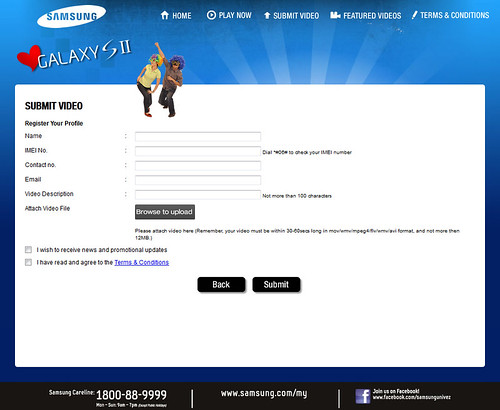
Have you visited the “I Love Samsung Galaxy S II” Campaign microsite developed by Samsung dedicated to Samsung Galaxy S II owners yet?
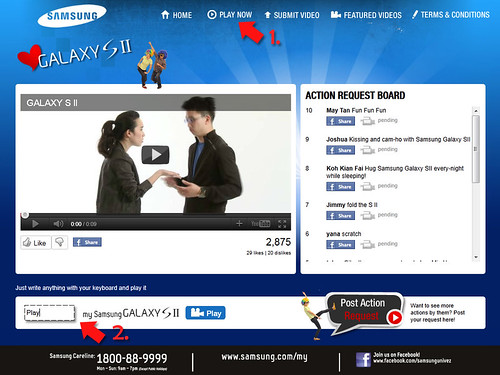
One of the cool feature in the microsite http://bit.ly/pa8JrF is in the Play Now page as indicated as number 1 in the above picture. There’s a text box at the bottom left (indicated as number 2) for you to key-in any word you like to get the talents to act the words in the video. Just click the Play button, the video will start playing.
Well, if you get bored after playing for a while, feel free to browse the videos submitted by Samsung Galaxy S II users too.
I’ve been eying on Samsung Galaxy S II since its launch in Malaysia in June 2011. It’s the superior hardware in Samsung Galaxy S II that attracts me compared to my Samsung Galaxy S which I’ve been using since end of last year. Besides, I’ve heard many good feedback from the current owners of Samsung Galaxy S II too.
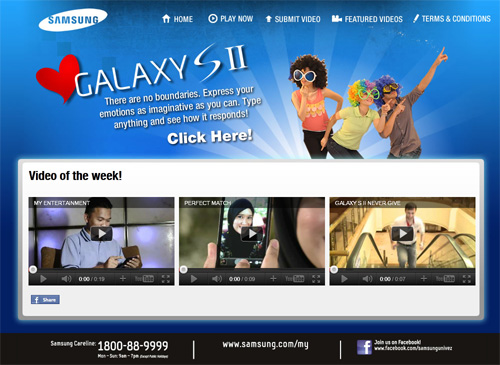
If you are already a Samsung Galaxy S II user and is proud of the phone, here’s a site http://bit.ly/pa8JrF for you to express how in love you are with Samsung Galaxy S II. It a microsite developed by Samsung dedicated to Samsung Galaxy S II owners to submit short videos showing their love for the phone.
Please feel free to watch all the videos submitted by the users and submit yours as well. Who knows your video could be used for Samsung’s next campaign! :)
I just attended the media launch of Nokia N9 in Malaysia on 13th September and below are some important announcements made during the events :-
- Nokia N9 will be available in Malaysia in early October 2011
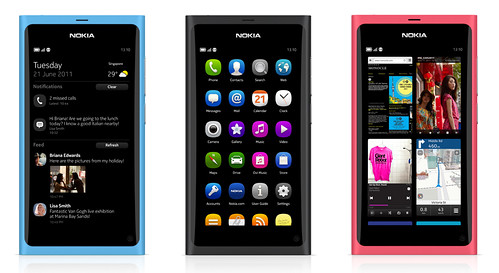
- Available in 3 colours : Black, Cyan & Magenta
- 2 storage options : 16GB or 64GB
- Prices : 16GB (RM1799) ; 64GB (RM2088)
- DiGi & Celcom will offer the Nokia N9 with attractive data plans
Check out the demonstration video of Nokia N9 below by Anthony Wilson, Nokia Head of Marketing Singapore, Malaysia & Brunei, during the event. He gave an introduction to all main features of Nokia N9, hope you enjoy the 10 minutes video.
I managed to record a video of me playing Need For Speed – Shift (a 3D Racing Game) on Nokia N9 during its media launch in Malaysia early this week on 13th September.
Below is the video I took :-
Nokia N9 is known to be good in multitasking, which simply means you can run several applications simultaneously. As you can clearly see at 3.06, the game is still running when I swipe from the corner of the phone. Besides, I completed the entire game while there are 7 other applications running in the background at the same time.


.................................


![SapiensBryan[a.t.]gmail[d.o.t.]com](https://www.sapiensbryan.com/wp-content/themes/adsincomewide/images/email.png "SapiensBryan[a.t.]gmail[d.o.t.]com")


Pages

Site Map
Admin
List All Posts Titles
By Month
- May 2016 (3)
- April 2016 (4)
- October 2015 (1)
- November 2014 (1)
- August 2014 (2)
- July 2014 (3)
- June 2014 (1)
- March 2014 (1)
- January 2014 (1)
- December 2013 (1)
- September 2013 (1)
- June 2013 (1)
- May 2013 (1)
- March 2013 (1)
- January 2013 (2)
- December 2012 (2)
- November 2012 (4)
- September 2012 (1)
- June 2012 (2)
- April 2012 (1)
- March 2012 (3)
- February 2012 (2)
- December 2011 (2)
- November 2011 (3)
- October 2011 (12)
- September 2011 (7)
- August 2011 (3)
- June 2011 (6)
- May 2011 (8)
- April 2011 (1)
- March 2011 (8)
- February 2011 (11)
- December 2010 (3)
- November 2010 (1)
- September 2010 (2)
- August 2010 (2)
- July 2010 (13)
- June 2010 (2)
- May 2010 (3)
- April 2010 (6)
- December 2009 (2)
- November 2009 (3)
- October 2009 (2)
- July 2009 (3)
- June 2009 (2)
- May 2009 (3)
- April 2009 (2)
- March 2009 (1)
- February 2009 (1)
- January 2009 (3)
- December 2008 (7)
- November 2008 (12)
- October 2008 (3)
- September 2008 (2)
- August 2008 (1)
- June 2008 (6)
- May 2008 (2)
- December 2007 (1)
- October 2007 (4)
- September 2007 (2)
- August 2007 (1)
- June 2007 (1)
- May 2007 (1)
- April 2007 (4)
- March 2007 (2)
- February 2007 (7)
- January 2007 (3)
- December 2006 (4)
- November 2006 (6)
- October 2006 (9)
- September 2006 (1)
- July 2006 (4)
- May 2006 (2)
- April 2006 (5)
- March 2006 (9)
- February 2006 (6)
- January 2006 (8)
- December 2005 (4)
- November 2005 (16)
- October 2005 (32)
- September 2005 (50)
- August 2005 (50)
- July 2005 (63)
- June 2005 (74)
- May 2005 (82)
- April 2005 (47)
- March 2005 (10)


