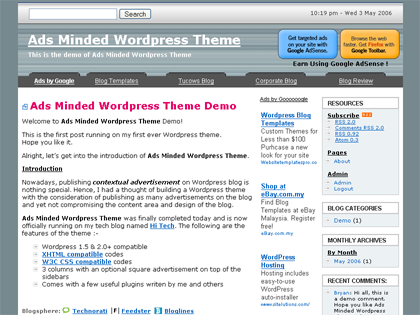
Finally I completed my first ever Wordpress theme.
Hope you like it.
Alright, let’s get into the introduction of Ads Minded Wordpress Theme.
Introduction
Nowadays, publishing contextual advertisement (such as Google AdSense) on Wordpress blog is nothing special. Hence, I had a thought of building a Wordpress theme with the consideration of publishing as many advertisements on the blog and yet not compromising the content area and design of the blog.
Ads Minded Wordpress Theme was finally completed today and will be officially running on this blog. The following are the features of the theme :-
- Wordpress 1.5 & 2.0+ compatible
- XHTML compatible codes
- W3C CSS compatible codes
- 3 columns with an optional square advertisement (Shows on main page) on top of the sidebars
- Search engine friendly and easy advertisement placement
- Comes with a few useful plugins written by me and others
- Just browse around the demo you will have a better idea.
Before you proceed, I would like to recommend you the easiest way to Monetize Your Site using Text Link Ads.
Sign up now via the link or banner then start making money almost instantly!
System Requirements
- Wordpress 1.5+ or Wordpress 2.0 installed
- Enable all plugins included in the package before using this theme.
Please do not use my themes for sites with pornographic, sexist and/or racist content of any kind.
Demo
Demo is available here.
You can use the Theme Switcher on the sidebar to switch between the wide version (1000px wide) and normal version (770px wide) in order to see the difference.
Plugins Used
- Submit It Plugin v1.0
- Comment Quicktags v1.0
- Get Recent Comments v1.0
- Live Comment Preview v1.7
- Optimal Title v1.0
- Previous Posts v1.0
What can Ads Minded actually offer ?
- 1. High CTR AdSense layout
Ads Minded uses a high CTR AdSense layout created by me which I named it QuickSenseTM (sounds similar to quicksand).
QuickSenseTM : High CTR AdSense LayoutI can’t disclose the CTR here as doing so is violating AdSense Term Of Service (TOS), but I can tell you QuickSenseTM has the highest CTR for all my advertisement placements.
- 2. Search Engine Friendly
Ads Minded was built with search engine in mind. I place the content column on the left side and the 2 sidebars on the right so that search engines read the blog content first before crawling the not-so-important items on the sidebar.
- 3. Advertisement Sequence
The sequence you place the advertisements is important because the first advertisement code usually carries highest paying advertisement. Hence, due to the high CTR of QuickSenseTM, I place it on top of all codes in order to get high paying advertisements.
- 4. Better Ads Targeting
Advertisements can be shifted around in the blog for better targeting just by shifting the advertisement codes. Each column can at least contain one type of advertisement format. They are designed to nicely fit different type of advertisements.
Some users of the theme were concerned about AdSense TOS Violation, hence I sent an email on May 7, 2006 to seek for confirmation from Google AdSense Team that this theme is 100% compatible to the TOS. On May 10, 2006, AdSense Team replied and gave a green light to Ads Minded theme. Below is the screen shot of the email :-
Here is the clearer screen shot.
So, it’s now confirmed that Ads Minded is 100% Compliant with AdSense TOS.
Cheers!
Installation
- 1. Unzip the downloaded file.
- 2. Place all files into /wp-content/plugin & /wp-content/themes folder respectively according to how the files are located in the zip file.
- 3. Login to WP admin control panel and activate all 6 plugins included.
- 4. Enable Ads Minded theme under Presentation.
That’s it. ![]()
Hope you like this theme.
Donation
As suggested by some Ads Minded users, here is the donation button. By the way, the theme still remains FREE. ![]()
Any amount will do, I’ll take it as a bonus.
Thank you.
Change Log (Latest version is in bold)
- v1.3 (May 16, 2006)
- Added archive.php.
- v1.2 (May 11, 2006)
- Modified 2 lines of codes in style.css (change width of #topbar and #topbar .topbartext to 770px) for better cross browser display.
- v1.1 (May 9, 2006)
- Fix a CSS style to suit IE’s poor support of padding
Only 2 changes :-
1. New style.css
2. Added quote.gif into /adsminded/images/ folder - Replace all advertisement codes with dummy pictures, so my advertisements won’t show in your blog

- Fix a CSS style to suit IE’s poor support of padding
- v1.0 (May 4, 2006) - The first version
Any feedback, please send me an email to
or drop a comment here. This theme is in version 1 at the moment, I’m sure more will come.
Thank you.
p/s : Those who are using this theme, please feel free to do a link exchange with this blog. As an appreciation, your website will be approved automatically. For everyone else, link exchange is still welcome, but the link exchange script will not approve your website if you do not have a link back.
Just a kind reminder here. Don’t forget to replace all advertisement codes with your own.
Blogsphere: TechnoratiFeedsterBloglines
Bookmark: Del.icio.usSpurlFurlSimpyBlinkDigg
RSS feed for comments on this post
Best Deal Ads :
Recent Posts :
IE7 Beta 2 Compared To Firefox 1.5.0.2Safer Sex : Ask For Sex Info Via SMS
Apple Macintosh In 1984
Seagate Releases 750GB HDD
Pirated Windows Warning Message
Segatoys iFish
Microsoft Delays Windows Vista Release
Google Finance - Personal Online Finance Website
Submit It Wordpress Plugin
Related Posts :
I'm Back And Theme Changed !
Hi all, It's been more than 1 month I didn't blog...
New Theme Viewer From Wordpress
Good news for all Wordpress users, old and new. A...
Ads Minded Wide Version
After 10 days since I released my first Wordpress theme...
WordPress 1.5.1.3
Dear all WordPress users, Here comes another WordPress update, WordPress 1.5.1.3. Directly...
Upgrade To WordPress 1.5.2
The latest version of Wordpress 1.5.2 is already released. According...

really cool template!, clean and good for ads
btw, is it possible to shift the sidebar to the left,instead of on the right?
Thanx
Nice theme. Love the QuickSense
Can shift but not recommended.
If you shift to the right then the search engine will crawl those aidebar codes first. This will make the advertisement in your blog content having lower paying advertisement.
Neo : I can’t think of a better name. LoL…
$$$ 0_0 $$$
kehkehkeh
Lilian : I can’t think of a better name for this theme as well. LoL…
great job!
btw, link units CPM and ad units CPM are separated.
Thanks, LcF.
The CPM flactuates but CTR remains high at all time.
Hi guys,
Version v1.1 is out. After receiving feedbacks from theme users, I have fixed a CSS style to suit Internet Explorer. Only the style.css is modified and one picture file (quote.gif) is added into /adsminded/images folder.
Thanks you.
Great theme!!!
You just forgot to change the version number to 1.1 in style.css.
Roger that and fixed.
Thanks a lot, Elad.
The screenshot shows 3 columns but this demo only has 2, based on the overall width, the content column would be extremely skinny… nice work though.
Hi Billy, the demo is showing 3 columns. I have not enough time to convert this blog to 3 columns yet due to the amount of plugins I am using. For sure, I will use Ads Minded in this blog very soon.
Currently, The content area of Ads Minded is having approximately 470px wide, just slightly smaller than usual 2 columns themes. Anyway, I will come out with a 1000px width version and a fluid version of Ads Minded soon. Stay tuned.
Congrats on your first WP theme.
Thanks, Che-Cheh.
Awesome theme! Any thoughts on a widget version?
Thanks, David.
Nope, not at this moment but will definitely consider it.
Perfectly placed Ads Minded Wordpress Theme
Sapiensbryan.com has released a wordpress theme which targets high CTR for ads. It can be either adsense ads or anything like adbrite too. I have seen several themes which are made keeping adsense clouds in mind. But none of them could convince me tha…
I will surely try your theme. thanks!
Wonderful commercial theme but I’m having an issue in the ‘blog categories’ I have an error that s-t-r-e-a-c-h-e-s clear off the screen. >>Warning: Invalid argument supplied for foreach() in /home/***/public_html/my-wedding-invitations/ wp-includes/template-functions-category.php on line 321
@luuk : Thanks. Can’t wait to see your blog in my theme.
@Holly : Sorry, I guess the error message has nothing to do with the theme because the error is coming from a file in wp-includes.
Hi SB –yeah, I know, but I don’t have this problem with any other theme so I was thinking you might know what the conflict would be. A really nice theme, thanks for sharing it
I’ll report back when I find the problem in case anyone else finds this issue.
HD
Hi Holly,
Sure, I can help look into the code on line 321 and see whether it’s conflicting with the theme. Will post it here if I manage to find any clue.
Thanks for sharing the feedback anyway.
I’ve got it!
This is a fresh WP install so I hadn’t added any of my own categories yet. Line 321 is looking for categories so I thought that maybe because I hadn’t added any yet, it might be the cause of a conflict. Sure enough, that was it!
Thanks SB, I’m going have fun with this one! ~~HD
That’s a common error for fresh installation. Glad that the problem is now solved.
Enjoy!
thanks… i already try it..
Glad that you are using it, Fazli. I have noticed there are more than 10 blogs using this theme within 3 days after the release.
I have been using QuickSenseTM design for the past 5 months or so. Based on my CTR research, Ads Minded theme design will definitely make a good fortune.
Enjoy everyone.
Phew…
Holly, Thanks for posting your ‘categories’ error. It saved me some time I’d would’ve spent scratching my head till I realized I forgot to add some categories.
I’m going to have fun testing this new theme. Can’t wait till you come out with the wider version. Thanks.
WebDiva
Thanks, Webdiva (nice name!).
The 1000px and 100% wide versions are on the way. Stay tuned.
Hey, great theme! But I have a question, and it’s a little of a concern — your Adlinks unit leaderboard is nicely situated, and camouflaged, but how certain are you that it isn’t breaking the Adsene TOS by having those “tab”-like shapes behind the ads? I think that might be interpreted as “drawing undue attention” to the ads, and may violate the Adsene TOS. Did you contact them and gotten their OK on it? Just a thought. Really great looking theme, though!
Hi Sam,
Thanks for sharing the thought.
As for the concern of violating the TOS, below is the reply from Google AdSense Team back in February 2006.
In fact, I have been using the same theme since June 2005 until now.
I will contact Google Team again soon just to make sure Ads Minded theme is safe to use.
Fantastic news! But the second one is definitely a good idea. Google Adsense has a bad tendency for one guy to say one thing and another guy to say another.
Hi again, Sam. The latest email was just sent 7 hours ago and waiting for the reply.
I am pretty sure all members of AdSense Team are very clear with AdSense TOS and they are very helpful in clearing ambiguous too. I have total faith in them.
Anyway, for me I don’t think the design will cause any problem as I’ve seen a lot of AdSense publishers putting images beside the ads which is “drawing more undue attentionâ€.
Hey Bryan.
just wanted to say thanks for this really, really, really cool theme.
In the basic it doesn’t really fit my needs, but it’s so damn flexible that it’s just awesome. Every change i’ve done was without any problem, ok one or two but that wasn’t too hard.
I’ve included your link in my footer so you will get a lot of nice backlinks when i’m done with my article directory / Blog ;o)
Again, it’s one of the most thought of themes i ever saw. The ads are placed 100% perfect and i’m sure each user that has a good trafficked blog will have a good reveneue just because of your nice placement!
Thanks,
Marc from Germany!
P.S Have a look at my site guys (and bryan) =) i will give you 100% revenue share of your own advertisement you can place on my site. Write an article, get backlinks, traffic and the 100% revenue for adsense, chitika emini malls and paypal donations for authors!
I’ve just opened the blog up today and in a few weeks after my marketing campaigns there will be some good traffic for you.
Thanks for all your compliments, Marc.
I wish you all the best for your blog and the marketing campaign.
I’m really glad to see people love using my theme and make use of it. Hope you can help to spread the words.
Cheers!
dude, so glad that you released your first theme~~!!! very proud of you. keep going dude. I will try it out.
Thanks, pal!
It took me quite a long time to release my first theme, the feeling is great though.
Bryan, did you ever get a response to your second email regarding the tab shadows?
Nope, not yet.
Perhaps I will receive it in the next couple of days.
Seems like I’ve got another theme already
Yes, I got borred real quickly with my previous themes. And I noticed this happens after a few weeks (or even hours) after I installed a new theme.The problem is that there are so much themes available for Wordpress, and now that I found another place …
Good news everyone!
Google AdSense Team has replied, below is the content of th email :-
Here is the screen shot of the email.
So, it’s now confirmed that Ads Minded theme is 100% compliant with AdSense TOS and safe to be used!
Cheers!
* Link to my theme was editted to make message shorter.
Great theme, Bryan. Thanks a million for sharing it! Excellent (fast) response to bug fixes as well.
Thanks for the compliment, Al.
Honestly, I feel happier to see satisfied users of my theme than the opposite.
On a side note, the 1000px wide and 100% wide version will be released in the next few days. Stay tuned.
Enjoy using the theme. Cheers!
[…] http://www.sapiensbryan.com/index.php/my-wordpress-theme-ads-minded/ […]
Hello Bryan, thanks for the awesome theme. You can see it live on my site about the Tour de France and other pro cycling events. You can see my content in your theme here: http://www.yellow-jersey.net
Couple of questions:
1) About the plugs, do I need to edit any of the template pages in the theme (like adding a snippet of code) or anything to get these working?
2) I like to use a lot of categories and try to squeeze as many words in the categories for better keyword targeting. Because of that I need to remove the amount of posts that are in each category. I can usually do with with other templates but your using different code in the sidebar.php file. What do I need to edit to remove those numbers?
Example Of What I Don’t Want: Paolo Savoldelli (6)
Example Of What I Do Want: Paolo Savoldelli
That is it for now, back to tweaking your theme and making it yellow …..
Cheers,
Tour Guy Aka … Brian
Hi Brian,
Somehow I don’t see my theme in the link you provided.
Anyway, let me answer your questions here.
1. Nope, you don’t have to edit anything to make the plugins work. I have embedded the snippets, you just have to activate them in WP admin panel.
2. You can replace the following codes in sidebar.php :-
list_cats(FALSE, ”, ‘name’,
‘asc’, ”, TRUE, FALSE,
TRUE, FALSE, FALSE,
TRUE, FALSE, ”, FALSE,
”, ”, ‘1′,
TRUE);
This code won’t display the count for each category. For detail, please refer Wordpress Template Tags.
Hope my reply helps.
Have a nice day.
Hey Bryan,
Yea, I should have pointed you to my /blog folder. I also have static pages on the site that mimic my old theme and layout. You can see your lovely theme (all yellow like) here:
http://www.yellow-jersey.net/blog/
I managed to get my sibebar working the way I wanted to by using the php coding script that I am used to. Any reason to switch back Bryan with the code you provided?
As you can see I edited a quite a bit of the css for a new color layout to work with with a site that has the word “yellow” in the domain. I doing so I have moved the (h2) page titles and the linkbars (with the adsense links in it) a bit too close together and would like to see a bit more white space in that area. This is apparent now on all the pages, permalinks, categories and the index page as well. I just want to move the first post on each of these pages down a little bit, right now they looked cramped.
My plan is to also hire someone at rentacoder to make me a nice cool image header with some of the great cyclists wearing the yellow jersey. Bryan do you see any problems with this?
Thanks for the great theme, very well thought out and the ad placement looks great
My stats from today already look promising with the adlinks unit 
Brian
Hi Brian,
First of all, you are welcome and thanks for the compliments. In fact, you are not the first one to inform me of the hike of the income from the ads link unit. Hope you can help spread the words too.
I have no doubt to agree yellow should be the colour for a cycling blog, all thanks to Lance Armstrong.
I like to use the code I provided in my previous reply because I can change any setting I like within the list_cats(); function, just switch them from TRUE to FALSE or vice versa. It’s all depend on our own preference.
You can put some space in between the header ads link unit and the h2 title by just adding
< BR/>at the end (after the word “end header”) of the header.php.To have a custom made header is definitely a good idea. That will definitely give a better impression to your readers. But you will need to be aware of the height of the header image, either you create a header image with the same height as current header image or alter the height in style.css to suit your new header image. The choice is yours.
Cheers!
Hey Bryan,
Great, thanks for the spacing code on the header.php page. Hard being self taught … all this php, html gibberish …. LOL
Still can’t get the plugins working? I all so noticed that many of the other people using the theme don’t have them activated either? I played around with the sidebar yesterday and had the recent comment plugin working after I added the code?
I will keep messing around.
What should the image size be for a custom logo right now ?
Brian
Hi Brian,
You are welcome.
As for the plugins, they are all optional to be used. It’s just I put them into my theme by default because I found all of them are essential even for a new blog. All plugin codes have already been placed into respective php files, so by activating all plugins included in the zip file from Wordpress admin panel will do. Hope you can solve this soon.
Current header image has height of 100px and width of 770px.
Thanks
You are welcome, Brian.
[…] Ken mentioned a new adsense optimised theme for Wordpress - Ads Minded […]
Like others I’m having trouble getting the plug-ins to work. For example I looked through all the theme files and could find a call to add_submit_it anywhere. Do I have to add it myself? I just downloaded 1.1 today.
thanks for the great work
Hi Charlie,
Thanks for using the theme.
My apologies for missing out the add_submit_it(); code in both single.php and page.php. I have added the code into the files in the latest zip file (v1.2). Can you please re-download the latest zip file. Sorry for the trouble.
Let me know if you still have problem.
Thank you.
Hey Bryan,
Thanks for fixing the submit plugin code, I had about given up on that one. I also wanted to ad a bit of code to each category page …
Archive for the ‘Adsense Revenue’ Category
As readers come into my blog from various pages I think it would help them understand “where they are”
I noticed however that your awesome site template does not use “archive.php” page?
Thanks,
Brian
Also Bryan, about the submit it plugin. I think this would be great on “all pages” of the template or on a blog. Anytime someone bookmarks a page on a blog it is a very good thing for that blog owner.
I have tried to add the code to the index.php page, and was also looking for the archieve.php page for this as well.
However when the code for the plugin is added to the index page it mess up the right menu and it ends up on the bottom of the page.
Any way to fix this?
Brian
Hi Brian,
Yup, at the moment the theme doesn’t have archive.php. Miss out this one while creating the first draft. Thanks for reminding. I will create a separate file as archive.php in the next version. Right now I’m cracking my head to complete the fluid version (fits in all screen sizes).
As for the Submit It plugin, the main idea of this plugin is for readers to bookmark/submit a particular post entry on the blog. That’s the reason it’s placed in the all single page but not in index.php. I guess if a reader would like to bookmark the blog, they will use the bookmark function in any web browser.
Have a nice day.
Best regards,
Bryan
Bryan,
Great, thanks for thinking about creating the archive.php, would be nice to see that.
About the “book mark” plugin, really makes sense to have it on all pages? Why not? Give the reader the option of adding content to these social sites. It can only boost traffic.
Anyway, I need to get some posts done now. Thanks for listening and I look forward to that archive.php page soon
Do you have a pal pay button around? I would like to toss a bear your way for your hard work
Brian,
Thanks for the idea of donating, really appreciate it. It’s really a surprise as I didn’t think of getting any monetary return from the theme at all. LoL… Anyway, will make a donation button after I’ve done with the work in hand.
Adding archive.php wouldn’t take so long I suppose. Hopefully the next version can be released in the next few days.
For me, I listen to all feedbacks and I do believe feedback is essential for improvements. I’ll try to fulfill everyone’s request though I know I won’t be able to please all.
Thanks once again, Brian.
No problem,
You desgin is quite good and deserves it, you might also want to think about adding “one” header image holder. This way people will have a very easy time replacing it.
Most of us on the net are not that savy with css, and it is tricky and all. I also wanted to mentioned that I have tweaked your theme still farther for added income via adsense and as I thought my ctr improved yet again after I added four images and a leaderboard right below the header.php…
you can check it out here:
http://www.yellow-jersey.net/blog
Now what is a bummer is that I had to use a table and now the site is not 100% css … however I rather see the click through rate go up
Brian
Bryan,
Just wanted to let you know, I just downloaded your first template again and started an install on another blog of mine.
Submit it plugin still causing problems, also most of the other plugins give me problems as well. Some how I was able to get the submit it plugin working on my tour de france site however since the fresh download no luck…. I got a php error on line 24 of the single.php page …
I messed with the code and now the menu is funky …
FYI
Brian
Try using add_pingandbookmark() instead of add_submit_it and see if that helps. That fixed the problem for me (no need to download the plugin separately)
@Brian : I did a fresh install using the latest zip file (using all new plugin and theme files) and no problem encountered.
It was my mistake to upload an older version of Submit It plugin into previous Zip file but it was fixed in v1.1. As Catnabbit stated, I was using add_pingandbookmark(); instead of add_submit_it(); in previous Submit It version. Sorry about that.
There are 2 ways to solve the Submit It plugin problem :-
1. Replace add_pingandbookmark(); with add_submit_it(); in single.php and page.php
OR
2. Replace the old submitit.php file in your Plugin folder with the new one from the latest Zip file.
I’m sure the problem will be solved entirely. If you still face any problem, please feel free to email me, I will look into your problem personally.
p/s: I just checked http://www.yellow-jersey.net/blog and found that there was a minor layout problem, perhaps you’ll need to take out the line break (
BR/>) after!-- end header -->in the header.php file.@Catnabbit : Yup, I was using add_pingandbookmark(); instead of add_submit_it();. It was my mistake to upload the previous version. Now the plugin and theme are up-to-date. Thanks for using the theme.
Hi all, v1.3 was just released.
Enjoy!
Hi Bryan, How come there’s no Author name?
i.e., entry posted by ___________ ?
Just wondering
Thea
Well, I’m still loving your theme Brian, I’m adding it to a second blog today–thank you so much for your hard work!
and Brian J: Your “Yellow Jersey Blog” is wonderful -you’ve done a beautiful job modifying the theme to suit your needs. Can you tell me how you got the shadow effect around the body? I’ve always loved the look of that effect
Holly
@Thea : Hi. I didn’t notice that initially. Thank you for pointing it out. Should have that in the new version.
@Holly : Thanks for the support! Brian J has one of the best modded Ads Minded I’ve seen. I’m collecting a list of nicely modded Ads Minded theme and will share it with you all once I have free time to do so.
Thanks both of you once again.
Bryan, what code did you use in adding the author part? Is it ok to customize your theme? Thanks again. I’m thrilled to use your theme!
Hi Thea,
Please feel free to customize my theme. It’s pretty easy to add the author part actually. Just insert the following code into single.php and page.php:-
By
< ?php the_author() ?>Please remove the space between < and ?.
Put the above code in front of the function comments_popup_link should work fine.
Hope this helps.
[…] After 10 days since I released my first Wordpress theme named Ads Minded on May 4, 2005, here comes the wide version of the theme. The main difference between the normal version and wide version is the width. The normal one is having the width of 770px whereas the wide version will have a width of 1000px. This version suits you if most of your blog readers are using screen resolution larger than 1024 x 768. Download Ads Minded Wordpress Theme Wide Version v1.1 Posted in News […]
Awesome theme I am using it on wickedmonkey.com
I have a question and a bit of advice to others.
First the advice ofr others who are thinking about customizing this theme I went and made custom graphics, replaced the header with my logos etc, only to notice Google really wants you to leave the H1 & H2 tags in place, so after all that time I removed my graphics and let the blog name & slogan appear in text, it improved my ads to be better related to my site.
Now my question, it doesn’t appear obivious to the surfer how to get around the site, I would want the page nav on top and botton on the index pages and increase it’s size by 1 or 2 font sizes.
What would be the best way to go about this.
Thanks!
Hi Tony,
Search Engines love H1 & H2, that’s the reason I purposely put the title under H1 & H2. I built this theme with some SEO tweaks.
If you would like the next page and previous page navigation links to appear on top and bottom of the page, just copy the following codes :-
< div align="center">< span class="menu">< ?php previous_posts_link('Next Posts »»') ?>
< span class="menu">< ?php next_posts_link('«« Previous Posts') ?>
< /div>
and paste the codes below :-
< ?php if (have_posts()) : while (have_posts()) : the_post(); ?>Don’t forget to remove the space right after < .
As for the font size, you can edit class menu in style.css.
Enjoy!
Sorr, I don’t understand
Can you please show me a sample? how to put the Adsense codes in those files?
I mean the following codes:
/* Delete off the codes below (from here until ***** line) and put in your AdSense & Firefox Referral codes */ ?>
Hi Bry,
Thanks for that tip. I’m still in the process of customizing your theme and so far, I’m really pleased with the outcome.
I’m planning to use it to all my blogs using different color schemes. I’ll post the links here for people to see once I’m done.
Thea
Hi Thea,
I’m so glad to see you like the theme so much.
Thanks!
Hi Ahmed,
I’ve done a screen shot of a sample of how to edit the file, the example I used was headerads.php please take a look :-
Before edit
After edit
Hope it helps.
Greeat theme !
I use it for my upcoming blog now BUT how can remove Google Search from the bottom ?
Thanks
Sorry, I got it now
BUT one more thing, how can I remove centerbar.php (skycraper ads) on all my pages/theme since I’d like to insert banner ads on every post.
Thanks
Hi Jerrie,
To remove the centerbar from the entire theme, what you need to do is just delete the following lines in index.php, single.php and page.php :-
< div id="centerbar">
< br/>
< ?php include ("centerbar.php"); ?>
< /div>
Don’t forget to remove the space right after the < .
After that, alter the width of class #blogs in style.css (change to something bigger than 470px) so that the content area covers up the free space left after taking out the centerbar.
By the way, you don’t have to sacrifice the skyscraper ads in centerbar if you want to use banner ads, because AdSense allows up to max 3 ads units on one page. Just don’t overcrowded your blog with too many ads will do.
Enjoy!
Hi Bryan,
Thanks for your reply !
I just want to create less ads so the readers will be tickled to click on my banner ads in the middle of reading my posts
Can I ask you two more things :
1. How to turn off a very long post that is visible in my index page ? You can have a peek in my blog here.
How to create expandable blog posts in WP that contain a link to the full version posts ?
I can manage this with Blogger but WP is really something new for me, sorry
2. I have a REDIRECTIFY plugin istalled in my WP and I already activated but it just don’t show up when I want to create a PAGE, any thought ?
I thank you so much for your help, Bryan !
Hi Bryan, It’s me again. I tried adding the author part but it doesn’t appear on the page. I’m planning to have multiple authors on my blog so that’s quite important. Where can I copy the code? Did you update the codes already in your theme? I’ve made a lot of changes so I don’t want to install the theme again, I just to copy that bit whre the “author” part can be found. thanks
@Jerrie : Yup, don’t put too many ads before you have enough traffic.
1. You can use the More feature as you can find in WP admin panel under Write’s Quicktags. Just inseart the More tab in the content where you want it to be hidden.
2. Some plugins need you to put in some codes into the file(s). You might need to refer to the documentation of REDIRECTIFY plugin.
@Thea : Hi again. You can copy the code as I written in this comment. You can also refer to Wordpress Codex, they have a few very useful examples there. Sorry, newer version is not ready yet as I am rushing for my Master thesis at the moment, that’s the reason of the lack of update to the blog as well. My apologies.
Anyway, don’t worry if you still can’t find a way to do it. Just let me know here, I will update the code then release a newer version.
Hi Bryan,
Great response ! Both are doing very well now
But, how come my theme looks so messed up when I use IE and IE said ” Done, but with error on page.”
The errors are :
1. Line : 2
Char : 1
Error : Syntax Error
Code : 0
URL : http://health-tips-and-reviews.com/
2. Line : 4
Char : 1
Error : ‘edButton’ is undefined
Code : 0
URL : http://health-tips-and-reviews.com/
It’s weird since I use Opera browser, it looks just fine and nothing is wrong.
I am wondering now
Hi Jerrie,
You can try to validate your website using W3 Validator. It can tell you which line is having problem and the possible cause of it too.
Hope you can solve the problem a.s.a.p.
Hey there! I’m madly in love with this theme, and have made some modifications to it on my site at http://www.coffeecancash.com
My problem is that I can’t seem to get the comments working. It appears to be trying to go to the article URL/#respond but that doesn’t exist?
Any help with this would be very much appreciated! I know I didn’t make any mods to the comments files or anything, so I’m not sure how this happened…
Thanks in advance, and thanks for a great theme!
Thanks a lot for your help so far, Bryan !
@La : Hi. Check if it’s your .htaccess working? If you have not changed anything in the comment files, the theme right out of the zip file should work fine.
@Jerrie : You are welcome.
[…] Ads Minded NEW tested with WordPress 2.0 […]
[…] Any feedback, please send me an email to sapiensbryan@gmail.com or drop a comment at http://www.sapiensbryan.com/index.php/my-wordpress-theme-ads-minded/ […]
hey, i might just be really dumb, but how do you change the advertising code?
Hi Brad,
Basically, you can edit the following 3 files to replace with your own advertising codes before you upload the theme to the server :-
1. headerads.php
2. centerbar.php
3. squaresidebar.php
Enjoy!
Bryan, Okay, I must be really dumb or it may be that I know almost nothing about PHP, If this was asp or asp.net then that would be a different story. Would it be possible for you to post an example of exactly how the code should look after replacing the adsense code? I’m not getting the directions in the templates about exactly where to start removing code and where to stop. ( Well I think I have the where to stop) but I’m not sure where to start. I keep getting an unexpected
It’s pretty easy, Bruce.
Here is a sample of screen shot I provided to another user of my theme the other day.
Check out the screen shots of the file below :-
Before edit.
After edit.
Hope this helps.
Have a nice day!
Just got the theme installed on my site. Looks great! Lets see if the ad CTR improves in the coming months.
Thanks for the theme!
Thanks Bryan, It never occurred to me to just get rid of all the PHP references. Looks like I’m on the right track now. Thanks for your help and the great theme. I’ve got a feeling this one is going to produce the results I’m after on a couple of blogs.
@UsedMac : You are welcome. Getting more traffic into your blog is the next thing you should do. I’m quite certain the CTR will go up though we can’t take it for granted. Good luck!
@Bruce : Glad that you are on the right track now. All the best to you too!
I’m installing your theme on blog number three Bryan –you have to get a “buy me a beer” button on this site….. you’ll be a drunken fool
Such a great theme!
I have a little tip to those that are wondering how to modify themes, it can be intimidating because you worry about messing up the original file right?
What I do is, while I’m in my FTP program, I have a folder opened called ‘WPmodifications>ThemeName’ - Next I open the original theme file that I want to modify and make mods save it in this folder.
When I upload this file to server, rather than overwrite the original theme file, I change the name of the original. I just put the number 1 in front of the original name like ‘header.php’ becomes ‘1header.php’
What this does is allows me to make modifications, test them and if they don’t work, I simply take the number 1 off the original file to go back to the original working file and try again. It has helped the php hopeless like me— Hope that helps someone else
Thanks again Bryan!,
Holly
Short yet useful tutorial you have there. In fact, that’s what I usually do too.
Anyway, thanks for the support!
SapiensBryan,
how to remove the chitika sidebar? Thanks.
Hi dynn,
I guess you are asking about the squaresidebar on the main page, right? If yes, you can delete off the following codes in index.php :-
< div id="squaresidebar">
< ?php include ("squaresidebar.php"); ? >
< /div>
The squaresidebar will disappear from the main page then.
SapiensBryan,
thanks sapiens…
Hi again, Bryan - no dice here with your recommendation on the .htaccess - it’s working fine with everything else, and I’m using the same host as I do on a dozen other WP sites where this isn’t an issue.
I noticed on some other sites using your theme that the comments doesn’t go to the URL/#respond as it does in my theme. I didn’t put that there, I didn’t change anything with the comments whatsoever. (I realize it does do that on THIS site, however I guess I’m just confused with all this.)
I haven’t changed anything, I even re-submitted my permalinks changes (/%category%/%postname%) which has worked again, on over a dozen other sites with no issue, but won’t work on this one, with this theme.
Any other ideas?
@dynn : You are welcome.
@La : Thanks for the feedback. I will definitely look into this issue in the next couple of days.
Hello Bryan,
It’s me again, I installed ads-minded on my site.
I need help us my post was cut-off please see considerhealth.com what can I do to solve this.
How can I make every post add something like:
Continue Reading » Post Title
Also I figure out that the error:
2. Line : 4
Char : 1
Error : ‘edButton’ is undefined
Code : 0
Appears only when live-comment-review plugin is activated, when it is deactivated the error is gone.
Thanks for your help.
Vince
Hi Vincent, I just went to your site and it appeared just fine under Firefox. I didn’t see any cut off.
To have “Continue Reading >>”, you can use More quicktag. Please refer to this comment.
To use Live Comment Preview, you’ll need to put in the following codes into comment.php and comment-popup.php :-
< div>< ?php live_preview(); ?>
< /div>
Put them before
< ?php endif; // if you delete this the sky will fall on your head ?>Hope you can solve it.
Thanks so much for that. It worked well, almost too well. Now, my sidebar is overlapping the header ads. Do you have any idea about why this would be happening? If you want to see the problem, you can check it out on the website that I provided.
As always, thanks a lot,
Brad
Hi Brad, just place a line break ( < br/> ) at the place you just deleted the squarebar codes will work wonder.
You are fast and awesome. thanks!
You are welcome, Brad.
Just love to see users of the theme are happy ones.
Cheers!
Hello Bryan,
Seems my blog is doing fine now.
I had to disable some plugins to fix the error
Line : 4
Char : 1
Error : ‘edButton’ is undefined
Code : 0
Thank you very much for the quicktag tip.
Vince
Hi Bryan! Great theme!,
I am having some problems, using it, can you help me out. I do not know which files, where and how to place my adsense code instead of yours. I have also seen the image you have provided in the previous comments, but I cannot seem to get it work. Can you please mail me a copy of the theme with your ads instead of the pictures, and then I will just replace it with my code.
Your help will be greatly appreciated,
Thanks a tonne!.
Hi Bryan,
Thanks for the time and effort to develop this awesome theme. I would like to use it on my two main blogs but I need the ability to have a graphic header without the Wordpress blog name overlay. Is there an easy way to add one on the wide theme? If so what would the dimensions be. Thanks for your help…
John
Bryan i had a question.. how comes when you login after a fresh install of this theme if you have the DEFAULT category in there it doesnt show up anything itil you put in a category?? like example i had the basic wordpress theme.. i installed your theme.. then went to categories there was the DEFAULT theme in there so i add a new catgegory called NEWS and went to view.. and it only showed the NEWS category in the list of cateories it didnt show the default catregory
second.. do you know how i can add adsense and images like the other bryan did on his yellow site i like that layout he has
third.. one a new install of your theme.. for some reason there is an amazon banner on the far left.. what the heck is that? and how do i remove it
4th.. any idea how the other bryan of yellow cycyling blog got that dark shadow border around his white area?
also.. how do you remove the TITLE LINK which is over the HEADER IMAGE.. i just want to replace the header image with mine and not have that title link over my header image..
@addy: I will send the email to you in the next couple of days, quite busy at the moment. Sorry about that.
@John: To replace the header image with yours, you just have to edit header.php.
@jon:
1. Category with no post will be hidden. To show the default category, try putting some posts into that category.
2. I think that’s his secret (quite a common method), you might wanna email him to figure out.
3. Both my Ads Minded themes (normal & wide) don’t have amazon ads in it.
4. I guess he put on his own background image.
To remove the Title tag, you just have to edit header.php.
Have a nice day, everyone!
Bryan thanks.. i have managed to figure out the 4 images and adsense.. though i wonder if its better actually to have adsense appear in the posts themself though. i wonder if there is a way to do that.. ill have to figure that out..
i tried to figure out how to switch it from right to left the columns but i just messed things up so i went back.. do you know the exact code i would change or swop around.. that would help thanks.. AWESOME blog theme
Bryan im running into a strange problem with my blog
If you look at my html code you will see that for every post it has 2 TITLE tags and the description tag is the same for every post.. when really the description tag should be displaying a portion of the post that way each description is unique to the post or homepage.
look
Criss Angel vs David Blaine illusionist Rivalry–Magic Tricks
what do you suggest i do to resolve the title tag twice and also how can i have it so that the description tag for each post is a portion of the post?
Shoot.. i tried to show you the source code and it chaned it…. here ill put QUOTES around it hopefuly then it wont change it
“”"
Criss Angel vs David Blaine illusionist Rivalry–Magic Tricks
“”"
ah its not going to work can you just go to here
magictrickscentral.com/magicvideo/10/criss-angel-vs-david-blaine-illusionist-rivalry/
then look at the source code and you will see 2 title tags and the description problem im running into
Hi Jon,
I just went to your blog but I didn’t see double Title tag in the header.
Anyway, the Title tag is in header.php file, no where else (unless you put it else where). So, to have only one Title tag just make sure there is only one Title tag except in header.php file.
As for the description, you can also edit header.php according to your preference. The Description tag only appear in header.php as well.
thanks bryan ill try the TITLE thing.. but the description thing seems is the issue..
When you click on a post and then click VIEW SOURCE in the browser you should see a unique meta description for that post.. just like you do on a regular html site.. instead its taking the same generic META DESCRIPTION from the header.php and placing that in..
so if in the header it says
meta description ” this is about magic ”
for every post its saying
meta description ” this is about magic ”
when really it should be showing a portion of the post in that meta description.. this way each post has its own description
Yup, jon, I totally understand your question. It’s just I’m too busy right now to go into detail.
One of the ways is to put an excerpt into the Description tag. Just replace the generic Meta Description with the following code :-
< ?php the_excerpt(); ?>
For detail explanation, you will have to refer to Wordpress documentation.
no problem man.. we all get busy.. plus this is free..
when you read this next.. i will have probably added that excert thing.. it would be cool to figure out a way to have the keywords meta to display the category names the psot has been filed under like conten= news, magic etc..
as for the other tag i dont know what that is.. the one called
meta name=”abstract” content=”One Wordpress Blog.”
yah this is weird.. ill have to play around with it.. but it is something i would consider adding in to your downloadable zip file as otherwise there are going to be a lot of blogs online with the same description tag.. people using this theme
jon,
I think it’s not about whether the theme is being free.
The Meta tag can be edited in header.php to suit everyone’s needs actually. Not necessary everyone should use the default one.
For your case, you just have to put the excerpt code I mentioned into the content in Description Meta tag.
So, it should look like this :-
meta name=â€abstract†content=â€< ?php the_excerpt(); ?>â€Hope I help.
I tried that.. then when you view the source code all it shows is that
meta name=”description” content=”"/>
meta name=”abstract” content=”"/>
meta name=”keywords” content=”"/>
For every page.. its not grabbing the description.. pplus you wouldnt want the description excerpt for the keywords.. as it would be duplicated..
what i have decided to use is a plugin.. to do it.. but even the plugin is messed up it puts the description and keywords half way down the page..
must be a solution to all